SAML Tokens - samltool.io

TL;DR
- Explains the difference between SAML tokens and assertions.
- Details the three core components of a SAML XML payload.
- Identifies common SSO integration errors and attribute mismatches.
- Demonstrates how to use SAMLTool.io for decoding and debugging.
- Provides a technical breakdown of IdP and SP communication.
It’s 4:30 PM on a Friday. You hit "Test Connection" on your new Single Sign-On (SSO) integration, expecting a clean redirect and a dashboard. Instead, you get a generic "400 Bad Request" or a cryptic "Invalid SAML Response."
Your only clue? A massive, unintelligible string of Base64 characters dumped in the URL parameters.
Welcome to the "black box" of identity management. If you’ve been here before, you know the panic. If you haven’t, get comfortable. You’re about to learn that the difference between a working login and a support ticket nightmare usually comes down to a single line of XML.
To fix this, you have to stop guessing at configuration settings and start looking inside the box. While the industry colloquially calls them "SAML Tokens"—borrowing slang from the OAuth/OIDC world—what you’re actually wrestling with is a SAML Assertion. This XML payload is the single source of truth for your user's identity.
If you can capture, decode, and read it, you’re the hero who fixes the integration. If you can’t, you’re just throwing darts in the dark. This guide breaks down the anatomy of that assertion and acts as a crash course on using standard debuggers like SAML Tool to turn a wall of text into a solved ticket.
What is a SAML Token (Assertion) Actually?
Let’s strip away the jargon. At its core, a SAML assertion is a digital passport.
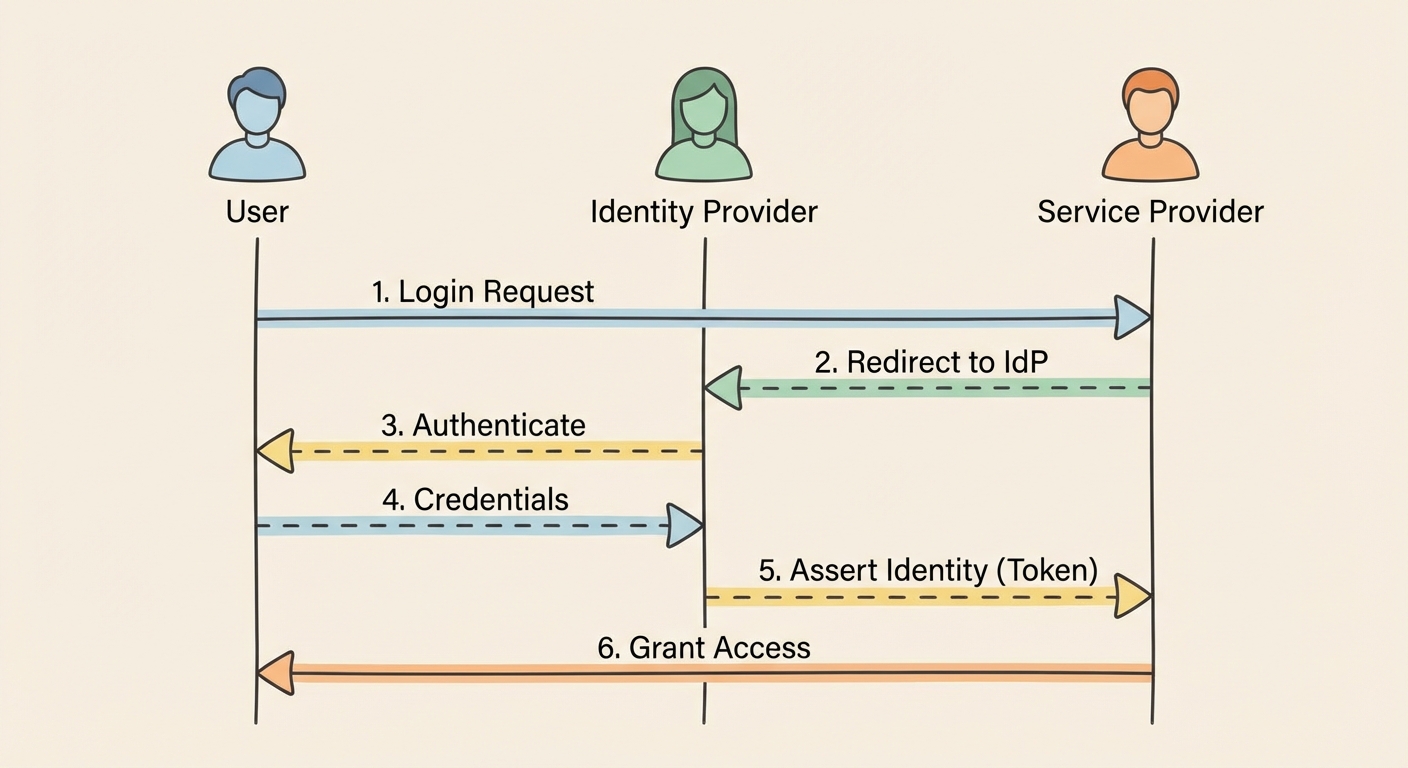
When a user logs in, they aren't logging into your application directly. They are logging into an Identity Provider (IdP) like Okta, Azure AD, or JumpCloud. The IdP verifies who they are, stamps a digital passport (the assertion), and hands it to the user's browser to deliver to you, the Service Provider (SP).
If the passport is damaged, expired, or stamped by an authority you don't trust, you deny entry. It’s that simple.
Technically, this "passport" is a block of XML that adheres to a notoriously strict schema defined by the SAML 2.0 Standard. While the XML can look like a terrifying wall of code, it really only contains three components that matter for debugging. Ignore the rest; focus on these:
- The Authentication Statement: This is the timestamped proof of login. It tells your app, "Yes, User X successfully entered their password at 10:00 AM." If this is missing, the user isn't logged in.
- The Attribute Statement: This is the user's luggage. It contains the profile data you need to build the user's session—email address, first name, department, and role. This is where 50% of errors happen. If your app expects a claim named
emailbut the IdP sendsUserPrincipalName, the integration fails silently. - The Signature: This is the wax seal. The IdP cryptographically signs the XML using a private key. Your application uses the corresponding public certificate to verify that the data hasn't been tampered with in transit.
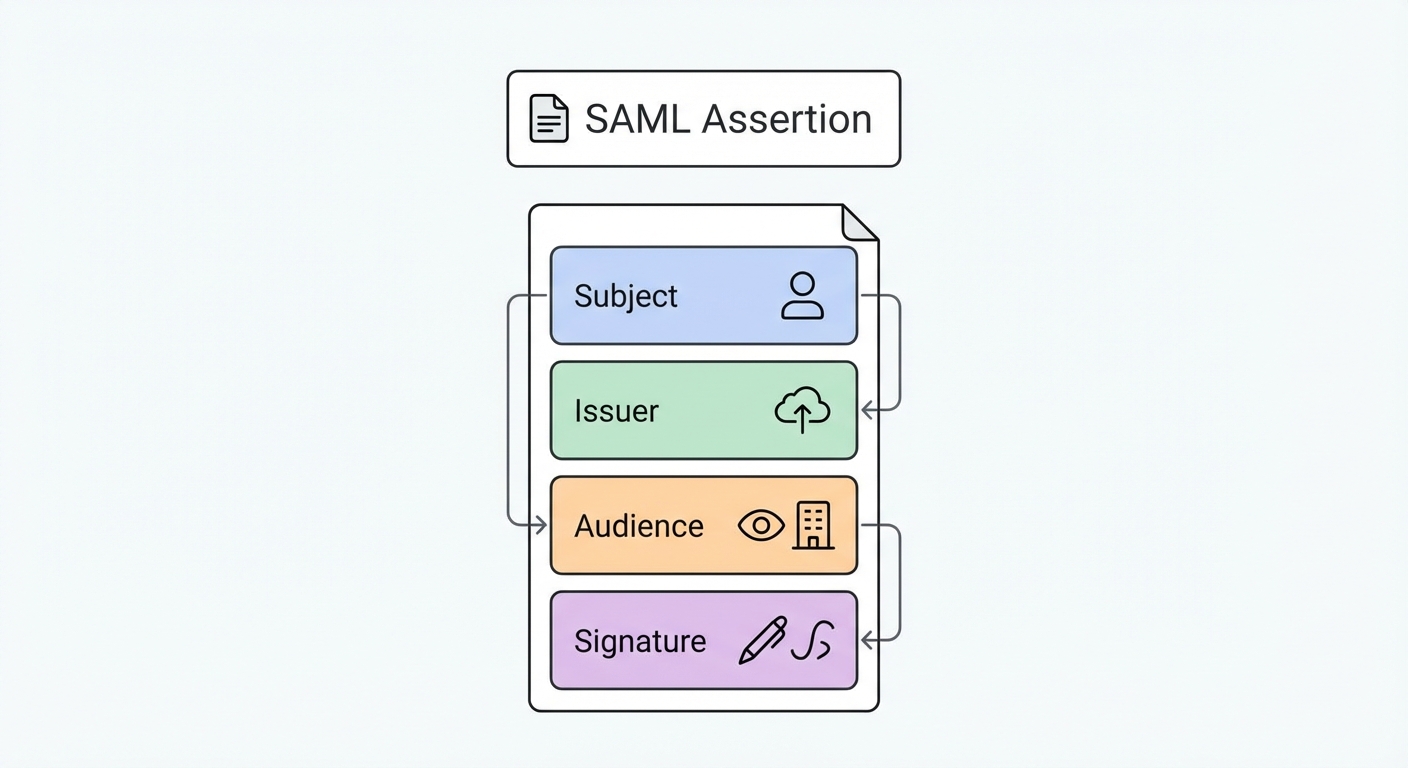
Here is the kicker: If any character in that XML is altered after signing—even a single whitespace or a carriage return—the signature validation fails, and the token is rejected. This fragility is a feature, not a bug. It ensures security. However, it also means that debugging requires exact precision. You can't just "eyeball" it.
How to Capture and Decode a SAML Response
You cannot debug what you cannot see.
Since the SAML response is passed through the user's browser (usually via an HTTP POST request), it is ephemeral. It exists for milliseconds. If the login fails and the page redirects to an error screen, the token is often lost in the network history, flushed away by the browser's cleanup routines.
The "No-Tool" Method (Browser DevTools)
Before you reach for a third-party tool, you need to know how to grab the raw data yourself. This is critical when working in high-security environments where pasting data into external websites is a fireable offense.
Here is the workflow used by every identity engineer:
- Open DevTools: In Chrome or Edge, press
F12or right-click anywhere and select Inspect. - Preserve the Log (Crucial Step): Navigate to the Network tab. Look for a small checkbox labeled Preserve log. Check it. Do not skip this. Without this, the browser will clear your network history the moment the IdP redirects you back to your app, wiping the evidence you need.
- Filter for SAML: In the filter/search box, type
SAML. This cuts out the noise of CSS and image files. - Trigger the Login: Go through the SSO flow. You will see a request (usually to an ACS URL) appear in the list. It will almost always be a
POSTrequest. - Extract the Payload: Click that request and look at the Payload tab. You will see a parameter named
SAMLResponse. It will be a massive string of random alphanumeric characters.
This string is your Base64-encoded XML. Note that it isn't encrypted (unless you specifically configured XML encryption, which is rare for internal apps), it's just encoded for transport. It’s like writing a letter in Morse code; anyone with the key can read it.
Using Samltool.io
Raw XML is painful to read. Base64 is impossible to read. This is where decoders save your sanity. You can copy that SAMLResponse string and paste it into an online debugger.
When you paste the string into the "SAML Response" field of a decoder, the tool reverses the Base64 encoding. Suddenly, the chaos becomes structure. You will see the <saml:Issuer> tags, the <ds:Signature> blocks, and the <saml:AttributeStatement> lists.
The tool acts as a translator. It separates the Encoded view (what the machine sees) from the Decoded XML view (what the human needs). More importantly, good tools will attempt to parse the XML structure to highlight syntax errors or malformed tags immediately, saving you from hunting for a missing bracket on line 405.
The 60-Second Triage: Why is Your Token Invalid?
You have the XML. Now, what are you looking for?
SAML is verbose. It's easy to get lost in the noise of namespaces and schema definitions. But here is a secret: In 90% of support cases, a "broken" SSO integration comes down to one of three specific errors. You don't need to read the entire document; you just need to check these three fields.
Error 1: The Clock Drift (NotOnOrAfter)
SAML is obsessed with time. Every assertion carries a Conditions statement with a NotBefore and NotOnOrAfter timestamp. This defines the validity window of the token, usually a short period (e.g., 5 minutes) to prevent replay attacks (where a hacker intercepts a token and tries to reuse it later).
Here is the problem: Servers drift.
If the server clock on your Identity Provider is even slightly out of sync with the server clock on your Service Provider, the token will be rejected.
- The Symptom: The login works for some users but fails for others, or fails intermittently. You might see errors like "Token not yet valid" or "Token expired."
- The Fix: Check the
NotOnOrAftertimestamp in the decoded XML. Compare it to your server's current UTC time. If your server thinks it is 12:05:00 and the token says it expired at 12:04:59, you have a clock drift issue. Ensure both servers are synced via NTP (Network Time Protocol). Most libraries allow for a small "clock skew" setting (usually 2-3 minutes) to absorb this variance. Turn it on.
Error 2: The Audience Mismatch (AudienceRestriction)
This is the classic "copy-paste" error. The IdP issues a token specifically for one application. It writes the distinctive ID of that application (the Entity ID) into the <AudienceRestriction> tag.
If your application expects the Audience ID to be https://myapp.com/sso but the IdP sends a token restricted to myapp-production, your application will slam the door. It’s like trying to use a movie ticket for Theater A at Theater B. The ticket is valid, but not for this show.
- The Symptom: Constant "Invalid Audience," "Untrusted Audience," or generic 403 errors in your logs.
- The Fix: Look at the
<Audience>tag in the XML. Copy that exact string. Go to your Identity Provider Setup and ensure the "Audience URI" or "Entity ID" field matches exactly what your application is expecting. - The Gotcha: Watch out for trailing slashes.
https://myapp.com/ssoandhttps://myapp.com/sso/are two completely different strings to a computer. This single character causes more failed integrations than you would believe.
Error 3: The Signature/Certificate
The SP needs a public certificate to verify the IdP's private signature. These certificates expire. If the IdP rotates its certificate but you don't update your application with the new one, the math won't add up.
- The Symptom: "Invalid Signature" or "Cryptographic Verification Failed."
- The Fix: This is rarely visible in the text of the XML itself. You can't "see" a bad signature just by reading the code. Instead, you verify this by looking at the metadata. Download the latest metadata XML from your IdP and re-upload it to your SP. This forces a refresh of the public keys.
- Pro Tip: If you are manually copying X.509 certificates, ensure you grab the headers (
-----BEGIN CERTIFICATE-----) if your system requires them.
Security Protocol: Is it Safe to Paste Tokens Online?
This is the elephant in the room. You are taking a credential that grants access to your application and pasting it into a third-party website managed by someone else. Is that safe?
The short answer: It depends on the data. The long answer: You need a sanitization protocol.
A valid SAML token allows anyone who possesses it to impersonate the user defined in the Subject field, provided the token hasn't expired yet. If you paste a live, valid token for a Global Administrator into a public web form, and that website is compromised or logging inputs, you have effectively leaked a session key.
The "Sanitization" Guide
- Dev vs. Prod: If you are debugging a development environment with dummy users (e.g.,
[email protected]), pasting the token into online tools is generally acceptable. The risk is low because the data is fake. - Production Data: NEVER paste a live production token containing PII (Real Names, Emails, Employee IDs) into a public debugger. Just don't do it.
- How to Sanitize: If you must use an online tool for a production issue, sanitize the data locally first.
- Decode the Base64 string on your local machine (using terminal commands like
base64 -don Mac/Linux or PowerShell on Windows). - Open the XML in a text editor (Notepad++, VS Code).
- Manually replace sensitive attributes (e.g., replace
[email protected]with[email protected]). - Then paste the structure into the tool to analyze the schema.
- Decode the Base64 string on your local machine (using terminal commands like
Note that modifying the XML will break the digital signature, so the tool will correctly report "Signature Invalid." However, you will still be able to inspect the structure, attribute names, and timestamps safely. For strictly internal auditing, you should rely on your own Security Best Practices and internal server logs rather than external debuggers.
SAML vs. OIDC: The 2026 Landscape
If you are building a new application today, you might wonder why you are dealing with XML at all when JSON-based OIDC (OpenID Connect) exists.
There is a prevalent "OIDC Takeover" narrative suggesting SAML is dead. This is false. While OIDC is the standard for mobile apps and consumer-facing identity (B2C), SAML remains the unmovable object of enterprise B2B identity.
Large enterprises, government agencies, and healthcare providers have built their entire infrastructure around SAML. It supports complex encryption and authorization flows that OIDC is still catching up to in some legacy environments.
| Feature | SAML (Security Assertion Markup Language) | OIDC (OpenID Connect) |
|---|---|---|
| Format | XML (Verbose, Heavy) | JSON (Lightweight, Mobile-friendly) |
| Primary Use | Enterprise SSO, Legacy Systems | Mobile Apps, SPAs, Modern Web |
| Complexity | High (Crypto signing, strict schema) | Low (RESTful, simple tokens) |
If you are selling software to the Fortune 500, you will likely need to support SAML eventually. They aren't going to rewrite their Active Directory Federation Services just because you prefer JSON.
If you are deciding which to implement, consult a guide on SAML vs. OIDC to weigh the trade-offs. However, regardless of the protocol, the principles of trust remain the same—ensure your Single Sign-On (SSO) Configuration is robust and your error handling is descriptive.
Frequently Asked Questions (FAQ)
Is a SAML token the same as a SAML assertion? Yes, colloquially. Technically, the "Assertion" is the XML data package inside the response. The industry uses the term "token" loosely to describe this payload because it functions similarly to a JWT (JSON Web Token) in OIDC.
Why is my SAML signature invalid? This is usually a mismatch between the certificate uploaded to the Service Provider and the one used by the Identity Provider to sign the token. It can also happen if the XML was modified in transit (even by a firewall or proxy that strips headers).
How do I base64 decode a SAML request manually?
You can use terminal commands. On macOS or Linux, run echo "YOUR_BASE64_STRING" | base64 -d. On Windows PowerShell, use [System.Text.Encoding]::UTF8.GetString([System.Convert]::FromBase64String("YOUR_STRING")). This is safer for production data than online tools.
What is the InResponseTo error?
This occurs when the IdP sends a response to a request ID that the SP doesn't recognize. This is often caused by users hitting the browser "Back" button, double-clicking the login button (sending two requests), or session timeouts where the SP has forgotten the original request ID.